
The execution date in a Sale Deed registration is the date on which the seller, buyer, and witnesses sign the Sale Deed. This date is significant because it represents the actual execution of the document before it is presented for registration.
Watch our Video Guide
Let me explain this with a real-life registration case.
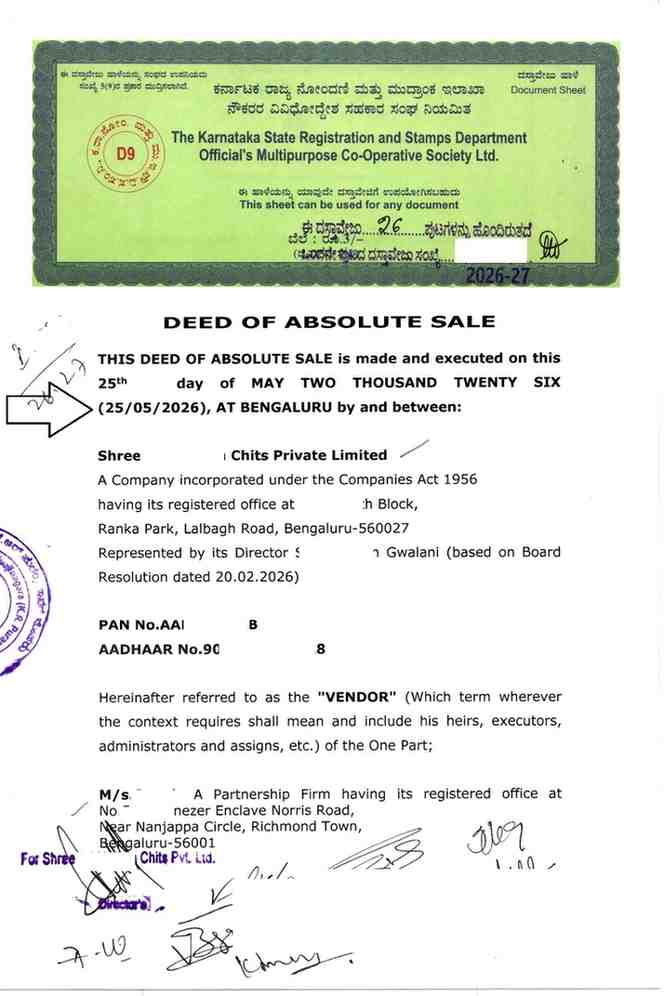
One of my clients, Mr. Suraksh, executed his Sale Deed on 25-05-2026. As highlighted in the Sale Deed below, the execution date was correctly mentioned as 25-05-2026.
After the registration was completed, Mr. Suraksh downloaded the Encumbrance Certificate (EC). Surprisingly, the EC reflected the execution date as 21-05-2026 instead of 25-05-2026.
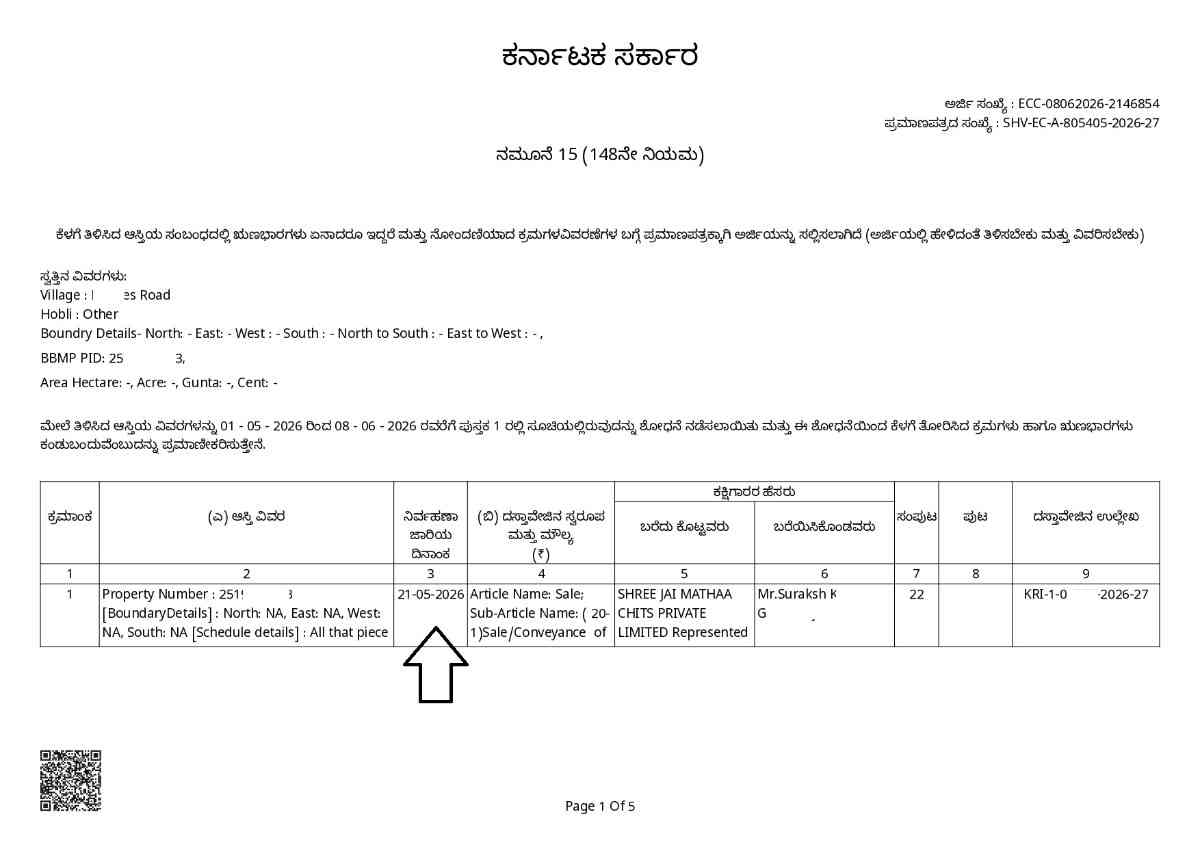
This raises an important question:
Why do the Sale Deed and the Encumbrance Certificate (EC) show different execution dates for the same transaction?
The answer lies in the application submitted through Kaveri Online Services.
At the time of submitting the online application for Sale Deed registration, Mr. Suraksh had not yet executed the Sale Deed. Therefore, he uploaded the draft Sale Deed while submitting the application and entered 21-05-2026 as the "Date of Execution" in Kaveri Online Services.
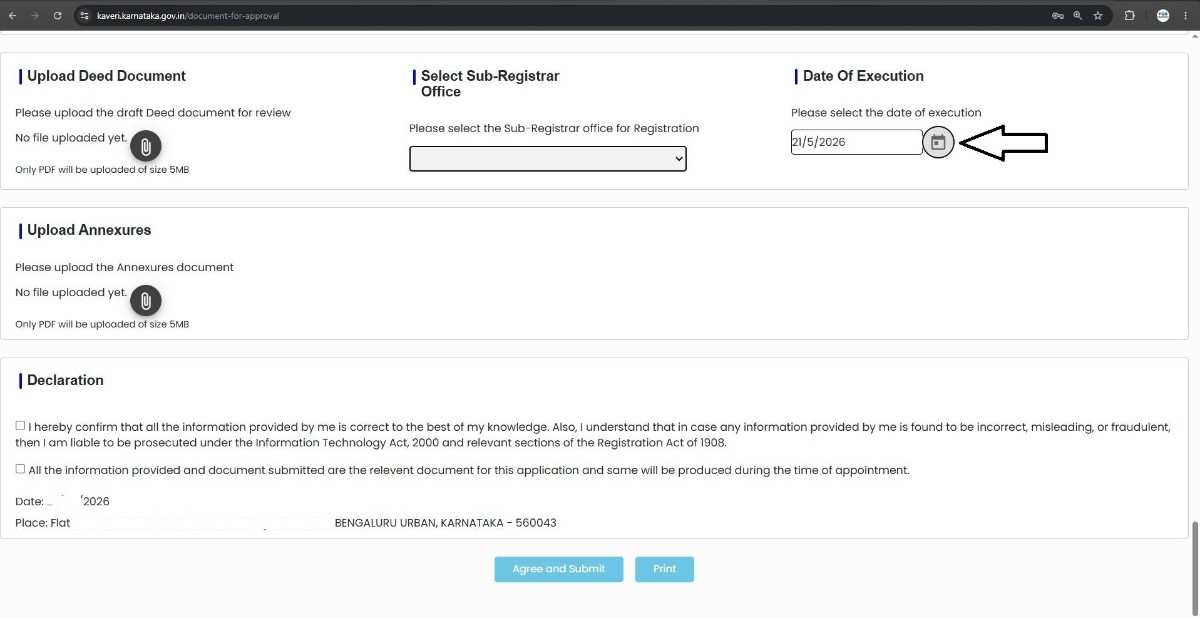
Mr. Suraksh subsequently booked the registration appointment for 25-05-2026. On the day of registration, immediately before appearing before the Sub-Registrar, the seller, buyer, and witnesses signed the Sale Deed. Consequently, the actual execution date of the Sale Deed became 25-05-2026.
Since the Date of Execution entered in the Kaveri Online Services application was 21-05-2026, whereas the Sale Deed was actually executed on 25-05-2026, the execution date recorded in the online application did not match the execution date mentioned in the registered Sale Deed. As a result, the Sale Deed and the Encumbrance Certificate (EC) reflected different execution dates for the same transaction.
How to Avoid This Common Mistake
To avoid such discrepancies, it is advisable to execute the Sale Deed first by obtaining the signatures of the seller, buyer, and witnesses. Thereafter, upload the executed Sale Deed while submitting the application for Sale Deed registration on Kaveri Online Services and ensure that the "Date of Execution" selected in the application exactly matches the execution date mentioned in the signed Sale Deed.
Following this process helps ensure consistency between the Sale Deed, and the Encumbrance Certificate (EC).
Need assistance with Sale Deed Registration Bangalore? Contact PGN Property for reliable, end-to-end support.
PGN Property
email: pgnproperties@gmail.com
Contact No. +91-9742479020