
A unit of measurement is the standard way used to measure the area of a property.
When we measure a residential property such as an apartment, house, building, or a small parcel of land, we commonly use the following units:
- Square Feet (Sq. Ft.)
- Square Metre (Sq. M.)
- Square Yard (Sq. Yd.) in some cases
For larger parcels of land, other units are commonly used, such as:
- Acres
- Guntas
WATCH OUR VIDEO GUIDE
It is important to understand these units because your property documents, such as the Sale Deed, e-Khata, and Property Tax Record, may show the property area using different units.
Your Sale Deed and e-Khata May Show Different Measurement Units
Let us understand this with an example.
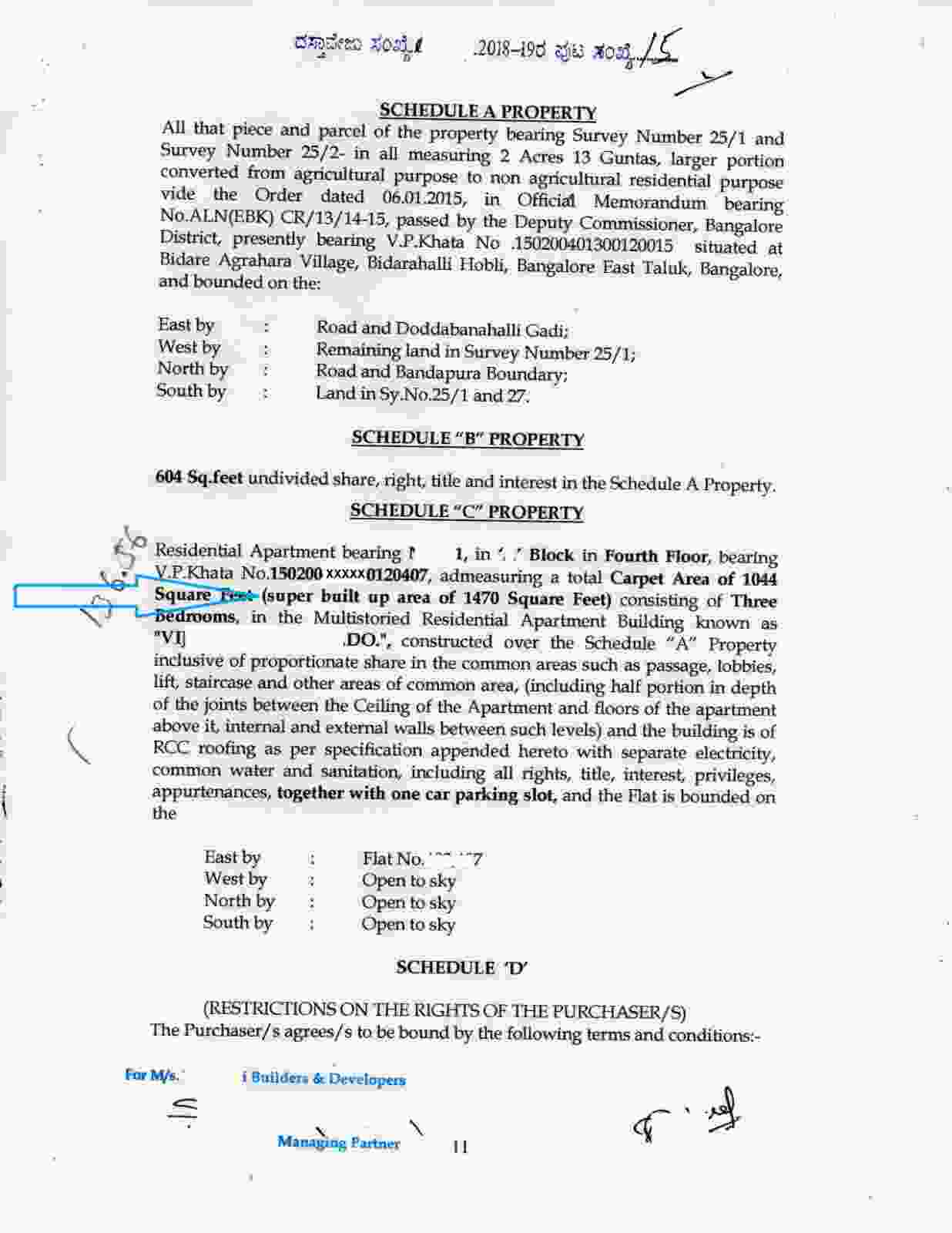
In the registered Sale Deed shown below, the super built-up area is mentioned as 1,470, and the unit of measurement is Square Feet.
For the same property, the e-Khata shows the super built-up area as 136.56, but the unit of measurement is Square Metre. The relevant portion is highlighted in the image below.
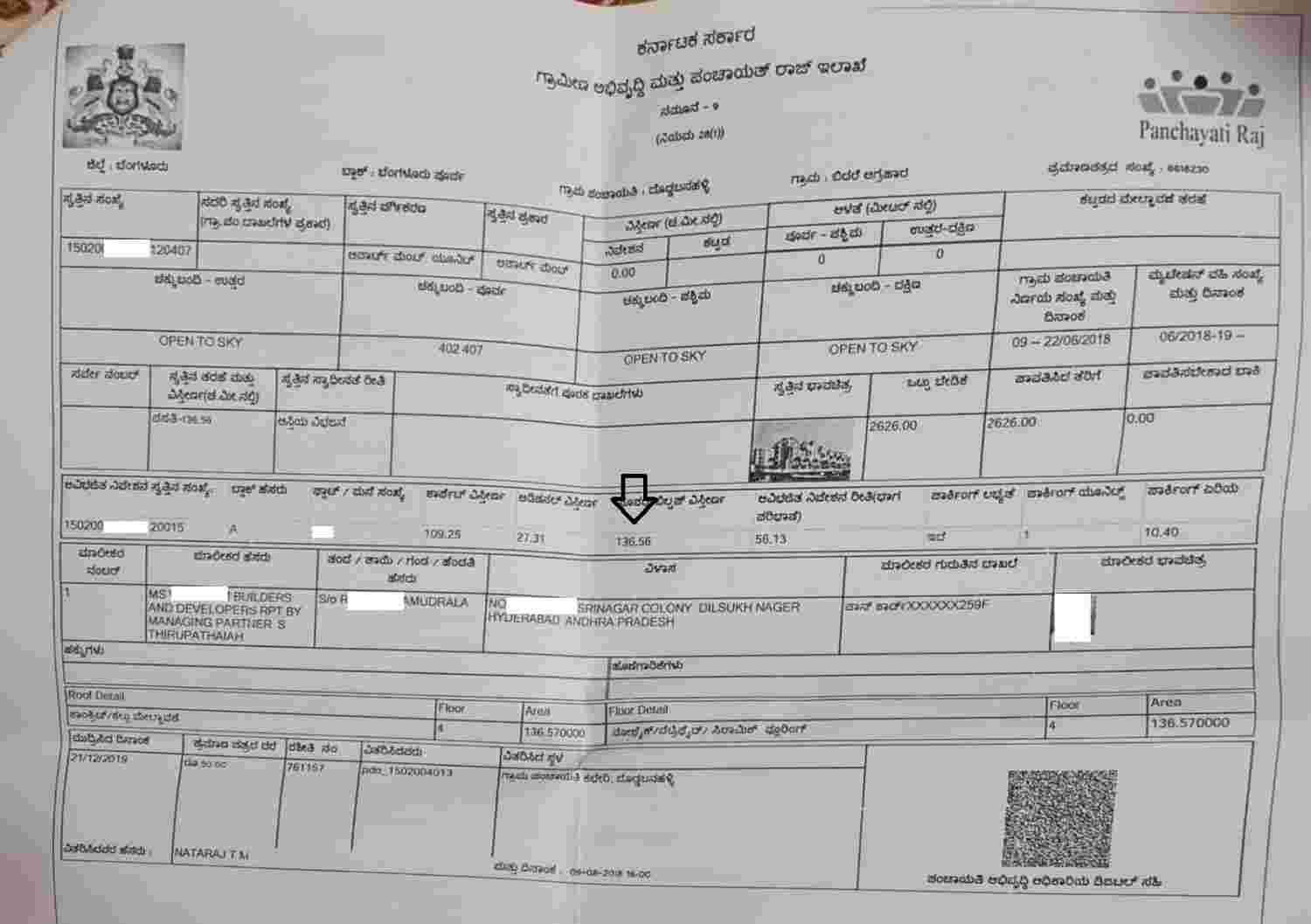
For someone who does not read the unit of measurement, it may cause confusion because the Sale Deed shows 1,470, whereas the e-Khata shows only 136.56.
However, 1,470 square Feet and 136.56 square Meter represent the same area
This is why it is important to always read the measurement and unit together
Be Careful When Selecting the Unit of Measurement in an e-Khata Application
We would also like to highlight an important mistake that property owners should avoid when submitting an e-Khata application: selecting the wrong unit of measurement.
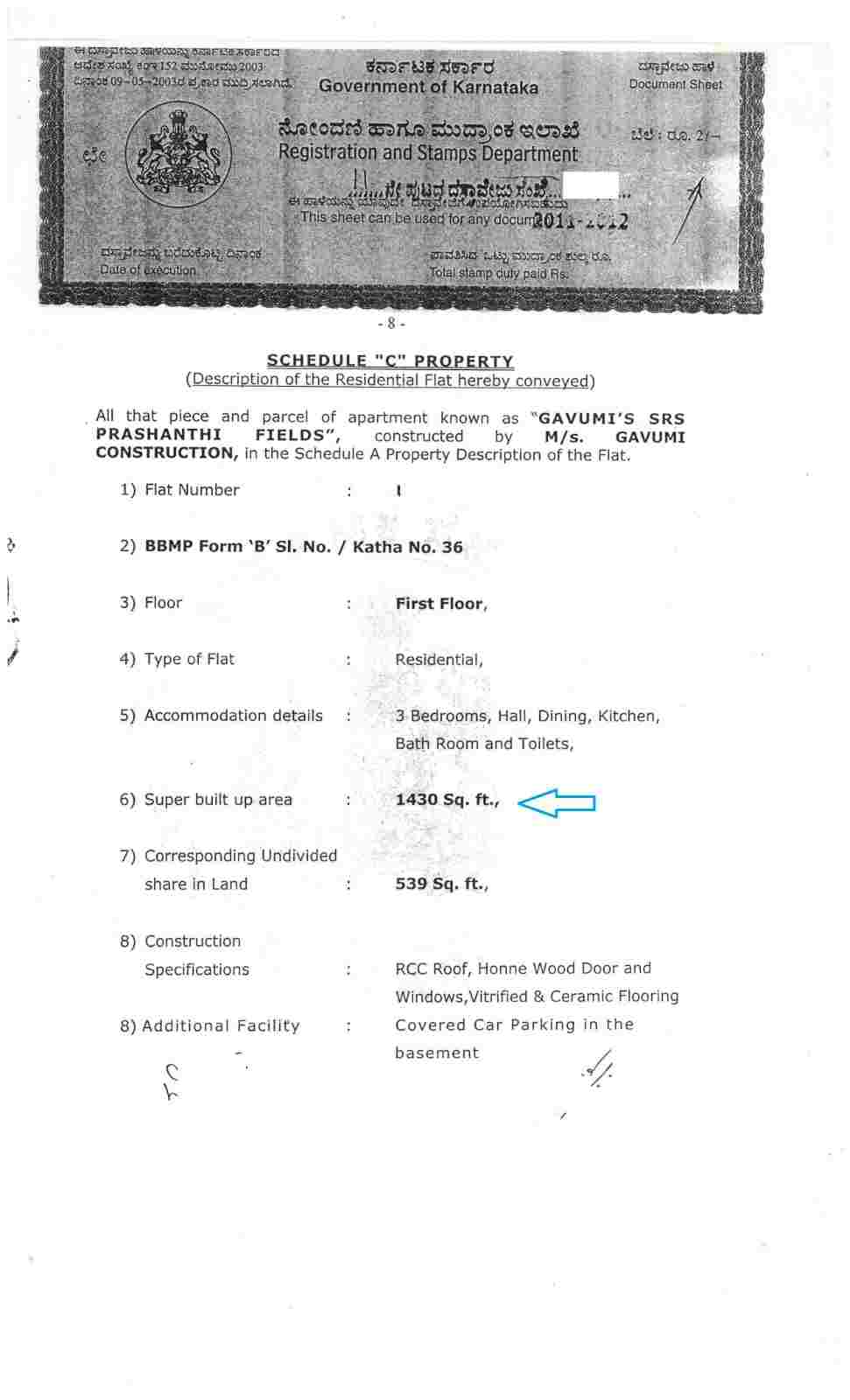
For example, in the Sale Deed shown below, the property measurement is 1,430, and the unit of measurement is Square Feet.
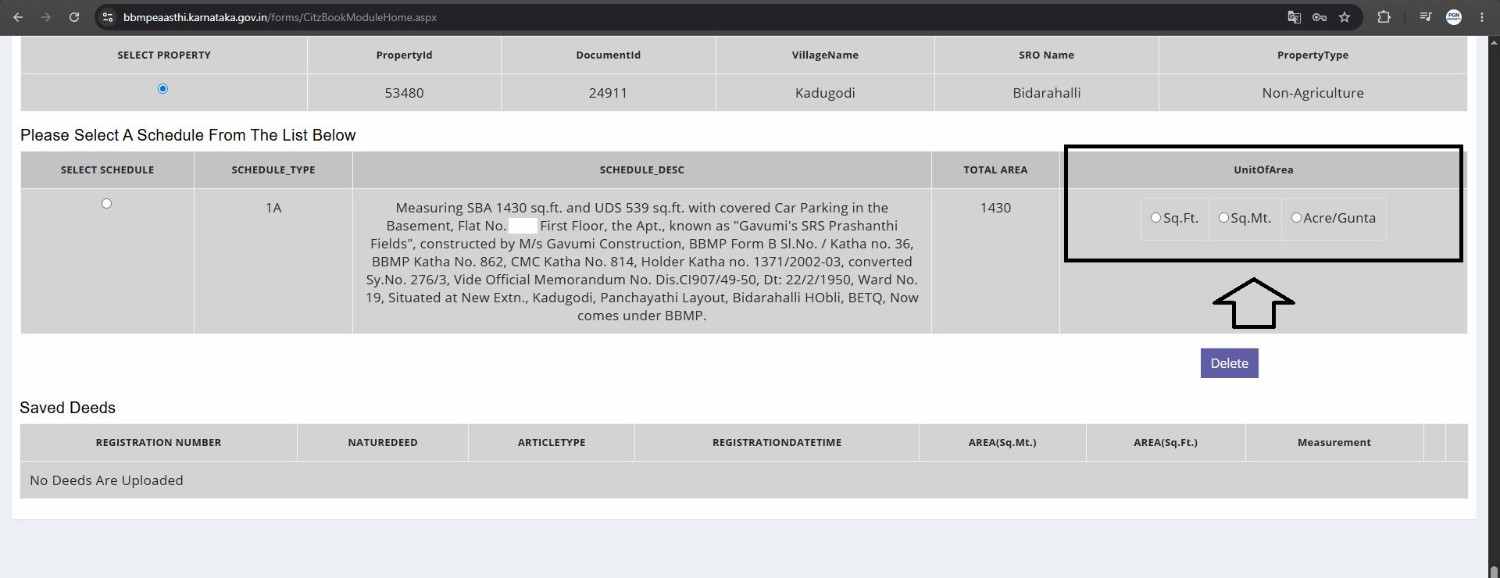
While submitting the e-Khata application, you may be required to select the appropriate unit of measurement. The available options may include:
- Sq. Ft.
- Sq. M.
- Acre/Gunta
The correct unit must be selected based on the measurement mentioned in your original property document.
Refer to the example below:
What Happens If You Select the Wrong Unit?
In one of our client's cases, the Sale Deed clearly mentioned:
1,430 Square Feet
However, while submitting the e-Khata application, the unit was mistakenly selected as Square Metre instead of Square Feet.
As a result, the final e-Khata was issued showing:
1,430 Square Metres
This is a significant difference.
The same incorrect measurement subsequently appeared in the property tax record, which resulted in a much higher property tax amount.
Eventually, the client realized that the problem had occurred because the wrong unit of measurement had been selected during the e-Khata application.
Correcting the Mistake
Once the incorrect unit had been recorded, the client had to submit another application to correct the measurement in the e-Khata
This meant additional time, and unnecessary stress.
Always check the unit of measurement before submitting your e-Khata application.
We would like to mention that e-Khata is mostly an automated process with limited human intervention. Hence, if my client had selected the correct unit of measurement, the entire e-Khata process could have been completed within 1–2 working days.
Since he selected the wrong unit of measurement, he had to go through an additional process to rectify the mistake, which resulted in unnecessary time and effort.
Hence, always read and select the correct unit of measurement to avoid mistakes while applying for e-Khata.
GBA e-Khata Can Make Comparison Easier
In the GBA e-Khata, you may see the measurement represented using both Square Feet and Square Metre.
The relevant details are highlighted in the image below:
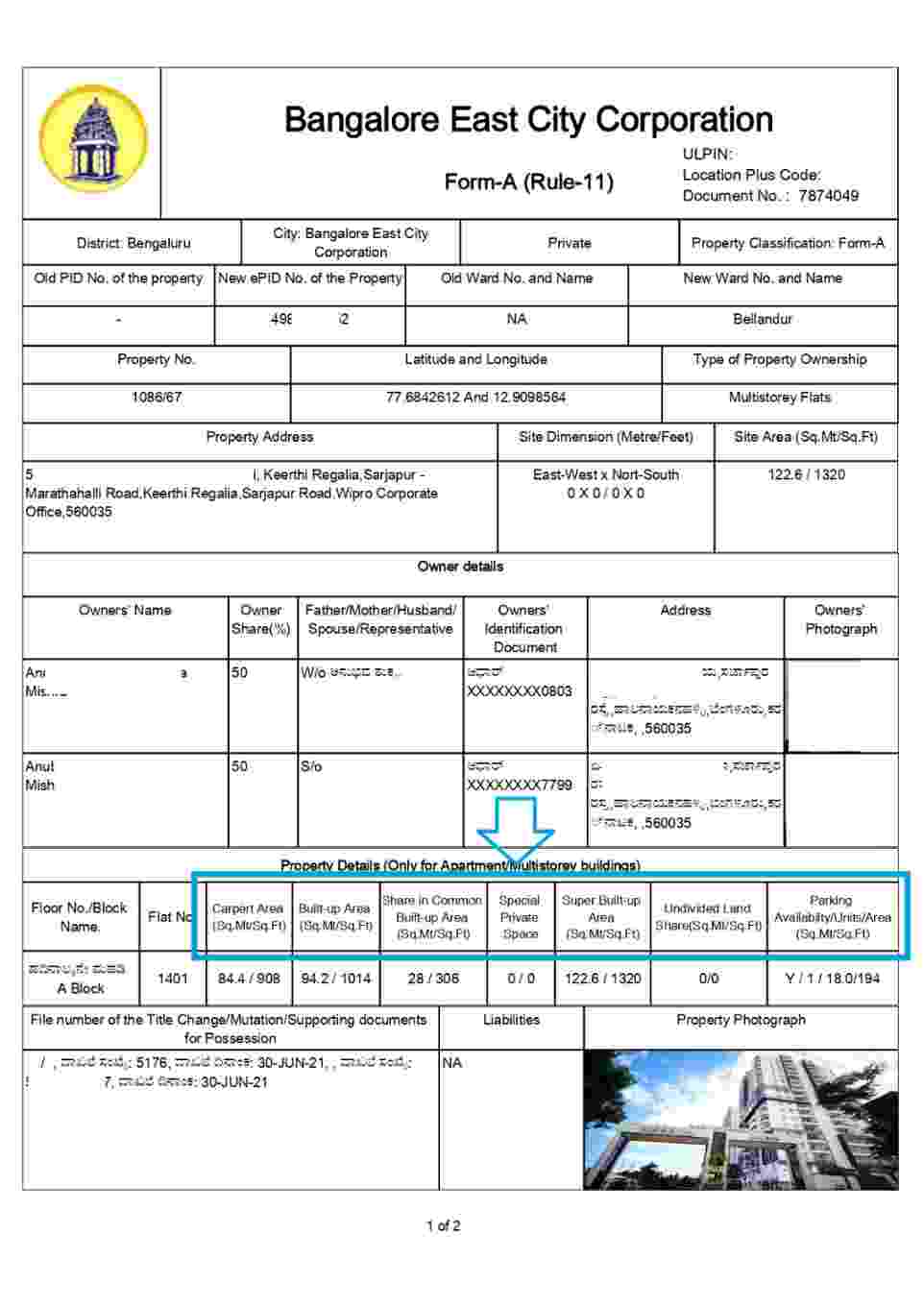
Showing both units can make it easier to compare the e-Khata with the Sale Deed.
This is particularly useful because a Sale Deed may mention the property area in only one unit, such as Square Feet, while the e-Khata may display the corresponding area in Square Metres.
When both units are available, it becomes much easier to understand that the two figures may represent the same property area.
Final Takeaway
When checking your Sale Deed, e-Khata, or Property Tax Record, do not compare the numerical values alone.
Always check:
1. The measurement value
2. The unit of measurement
3. What the measurement actually represents, such as super built-up area, carpet area, or UDS
At the same time, selecting the wrong unit while applying for e-Khata can result in an incorrect property measurement being recorded and may create complications with your property tax record.
Therefore, always read and select the correct unit of measurement before submitting your e-Khata application.
A simple check at the beginning can help you avoid correction process later.
PGN Property provides professional assistance with Property Registration and e-Khata services.
Email: pgnproperties@gmail.com
Phone: +91 9742479020
Website: https://pgnpropertymanagement.in/services/