
VIDEO GUIDE: HOW TO REGISTER MODT ONLINE To help you understand the process more clearly, we have also created a detailed step-by-step video on How to Register the Memorandum of Deposit of Title Deed (MODT) in Karnataka using Kaveri Online Services. This video covers the complete workflow, including document preparation, online application, fee payment, registration at the Sub-Registrar Office, and downloading the updated EC.
WHAT IS A MEMORANDUM OF DEPOSIT OF TITLE DEEDS (MODT)? The MODT is a legal document signed between the bank (lender) and the borrower, acknowledging the deposit of the original property title documents with the bank as security for a loan. It includes key details such as:
- Name of the bank
- Name(s) of the borrower(s)
- Loan amount sanctioned
- Property schedule (description and location)
- MODT Document – Memorandum of Deposit of Title Deeds
- Exemption Letter – Issued on the bank’s letterhead (stating exemption from personal appearance)
- ID Proofs
- Self-attested ID proof of the bank’s authorized signatory
- ID proof of each borrower
- E-Khata (as of June 9, 2025, mandatory in Karnataka)
 Below is an image of the Memorandum of Deposit of Title Deeds (MODT). This document contains key details including the name(s) of the borrower(s), the sanctioned loan amount, and the complete property schedule
 Below is an image of the self-attested identity proof of the bank’s authorized signatory, as required for the MODT registration process

STEP-BY-STEP PROCEDURE TO REGISTER MODT ON KAVERI ONLINE To register the MODT at the sub-registrar office, an application must be submitted through the Kaveri Online Services portal. Once the uploaded documents are verified, you can proceed to make the required payment and schedule a registration appointment Here is the weblink to submit an application https://kaveri.karnataka.gov.in/landing-page Login using your username, password, and captcha, refer to image below

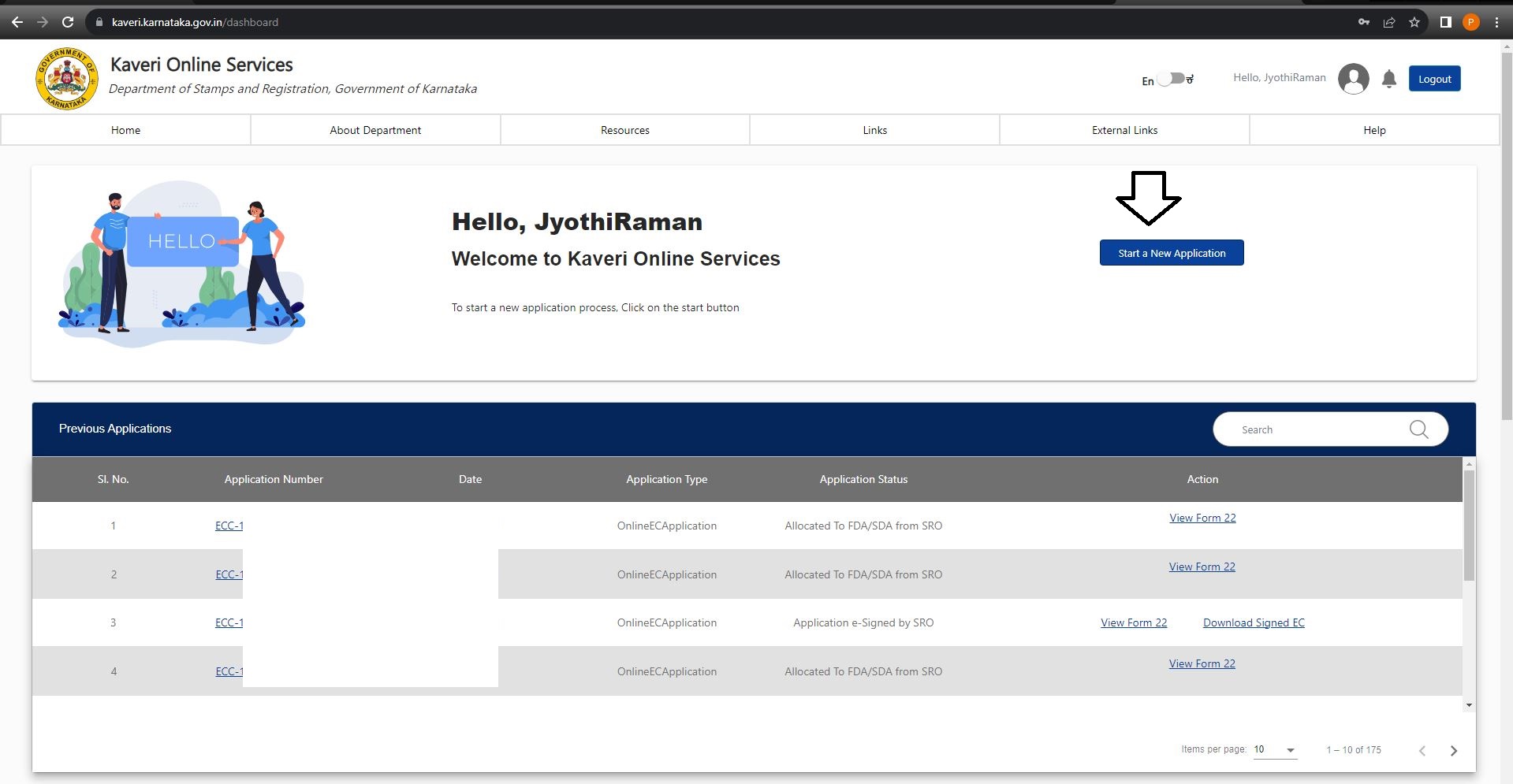
On the home page, click on Start a New Application. Refer to the below image
 Click on DOCUMENT REGISTRATION, refer to image below
 Prerequisite for Document Registration: click on Continue. Refer to below image

In Article and Sub Article, select the following options from the dropdown list:
- NATURE OF DOCUMENT: DTD
- ARTICLE: Agreement relating to the deposit of title-deeds,pawn or pledge
- SUB ARTICLE: 6 (1) (II) - Deposit of Title Deed (DTD) more than 10lakhs

In Type of Document, select NON-AGRICULTURAL. Refer to below image

Jurisdiction: As mentioned in the above context, the property is located in BBMP jurisdiction in Bangalore. So we select Others. Refer to below image

- (If the property is located in BBMP, CMC, BDA, BMRDA jurisdiction, select Other) . Edit on 9th June 2025, Select e-Aasthi
- (If the property is located in the panchayat jurisdiction, select e-Swathu)
- WARD NUMBER: BBMP Ward No. 5 (check your ward number in your property tax receipt)
- INDEX II: VILLAGE : Jakkuru
- Zone : BBMP
- ROAD: Select your apartment or developer name in the dropdown list. In my case, neither my apartment or developer name is not listed, so I selected Converted Site at the top of the list
- PROPERTY NUMBER TYPE: Select Flat No/ Property No. /Villa No from dropdown list
- PRESENT PROPERTY NUMBER DETAILS : Entered my flat number
- Total Area (in Sq. Meter) : 168.99 (entered my super build-up area)
 Click on Add More. Refer to the arrow mark in image below

- PROPERTY NUMBER TYPE: Select Survey No. from the dropdown list
- PRESENT PROPERTY NUMBER DETAILS: Entered property Survey No.
 Similarly, you can click on Add more and add as many property details as you want
Click on Submit & Continue. Refer to the below image
Similarly, you can click on Add more and add as many property details as you want
Click on Submit & Continue. Refer to the below image
 Based on the property information we provided above, image below is the property result
 Click on Save Property & Continue
Enter the property schedule, which includes measurements, boundaries, and property description. Refer to the below image
 Click on Save and Continue
In my case, three executives. They are a bank and two borrowers, we selected 3 in number of executant. Refer to the below image
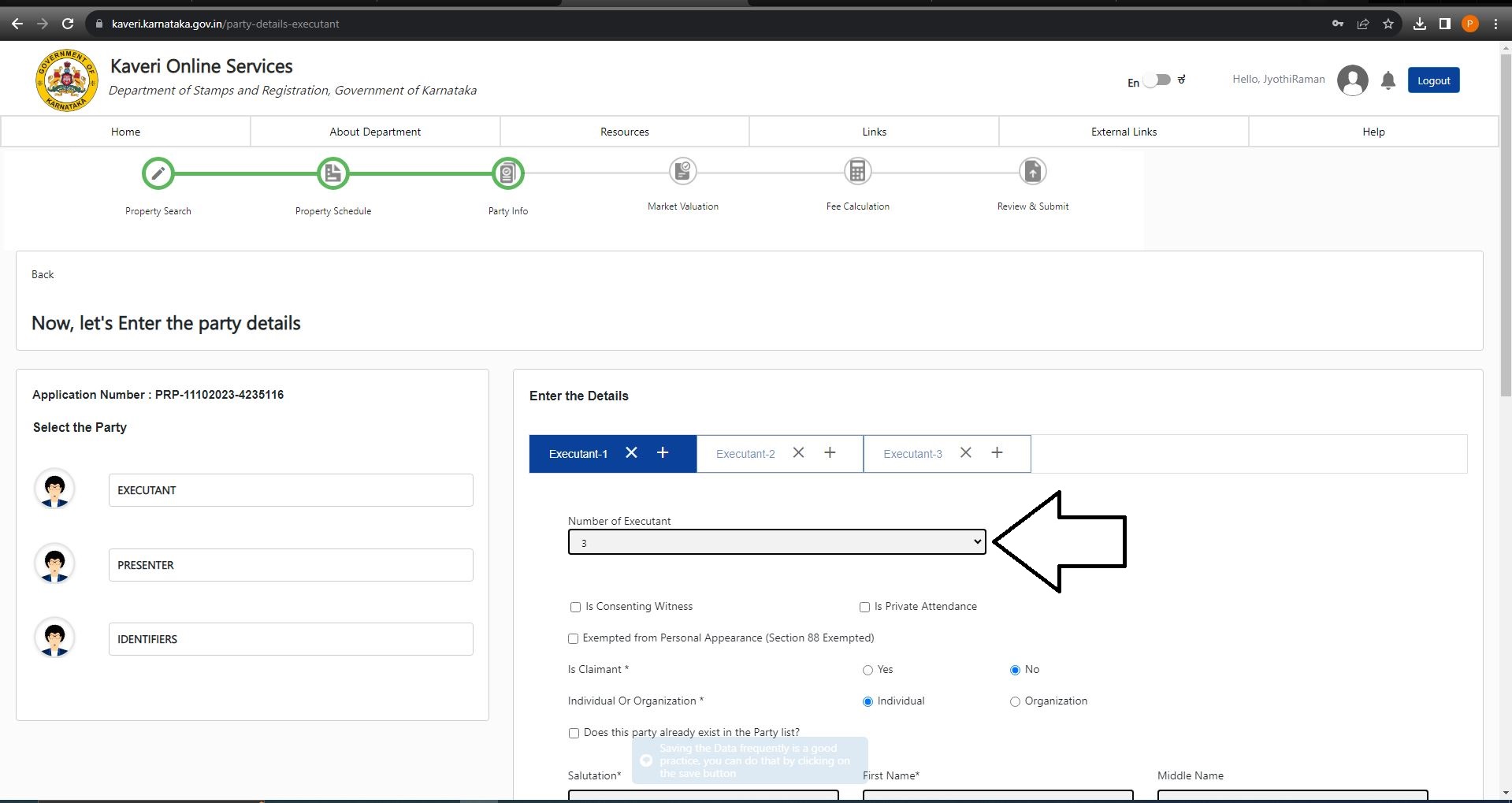 If you scroll up and refer to the exemption letter, we highlighted section 88, which means that SBI is exempted from the personal presence in the sub-registrar office.
- So we selected Exempted from Personal Appearance (Section 88 Exempted)
- In Covering Letter Number, enter your loan account number and upload the exemption letter in PDF
- Is Claimant: Select Yes
- Individual Or Organization: Select Organization
 Followed by the details of the bank and the authorized signatory. The details include name, address, and authorized signatory ID proof number. Refer to the below image
 Click on Save Executant -1 And Go To Next. Refer to below image
In EXECUTANT -2:
- Is Claimant: Select No
- Individual or Organization: My client is borrowing the money as an individual and not representing any organization, so I selected Individual
 Followed by the details of the borrower's name, age, gender, relative name, mobile number, ID proof number, and address. Refer to below filled image
 Click on Save Executant- 2 And Go To Next
In EXECUTANT -3
- Is Claimant: Select No
- Individual or Organization: My client is borrowing the money as an individual and not representing any organization, soI selected Individual
 Followed by the details of borrower's name, age, gender, relative name, mobile number, ID proof number and address. Refer to below filled image
 Click on Save Executant- 3 and click on Move to PRESENTER. Refer to below image
 Click OK in pop-up message. Refer to below image

In Choose Presenter, select a borrower name in dropdown list and click on Make Presenter. Refer to below image

IDENTIFIER means witness. Enter the details of IDENTIFIER -1, the details include name, age, gender, relative’s name and address. Select the IDENTIFIES from the dropdown list. Refer to below image
 Click on Save IDENTIFIER -1 And Go To Next
Enter the details of IDENTIFIER -2, the details include name, age, gender, relative’s name and address.
Select the IDENTIFIES from the dropdown list. Refer to below image
Click on Save IDENTIFIER -1 And Go To Next
Enter the details of IDENTIFIER -2, the details include name, age, gender, relative’s name and address.
Select the IDENTIFIES from the dropdown list. Refer to below image
 Click on Save and Continue
MODT does not require Market value calculation, therefore, we clicked on Continue to the next step. Refer to the below image

Sanctioned loan amount from SBI is Rs.85,00,000, so entered Rs.85,00,000 in Consideration Amount. Refer to below image
 Click on Save and Continue
Exemption letter in one page and MODT in two pages, total of three pages, so entered 3 in Number of Pages. Refer to the below image
 Click on Calculate. The calculation page appears below, refer to below image
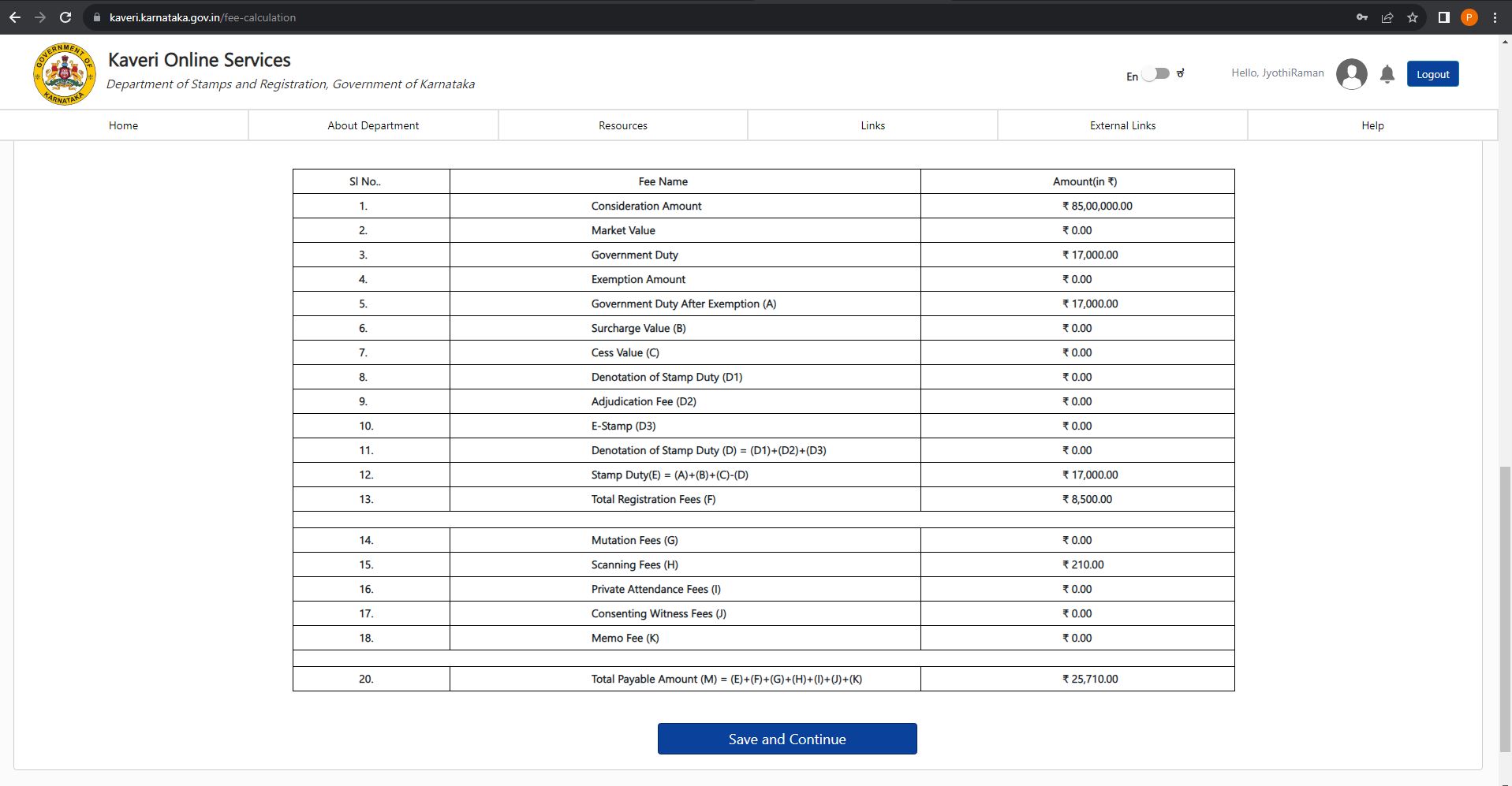 The break-up of the above calculation is:
- Stamp Duty: 0.2% of loan sanction amount (0.2% * 85,00,000 = 17,000)
- Registration fee: 0.1% of loan sanction amount (0.1% * 85,00,000 = 8,500)
- Scanning Fee: 35 per page. Total pages including registration page, is 6 (6 *35 = 210)
- Stamp Duty: 0.5% of loan sanction amount
- Registration fee: 0.1% of loan sanction amount
- Scanning Fee: 50 per page)
Final page summaries following details:
- Property
- Presenter
- Claimant
- Executant
- Identifier
- Stamp Duty

At the bottom of page:
- Upload Deed Document: Upload MODT in PDF, file size should be less than 5MB
- Upload Annexures: Merge the ID proofs of bank’s authorized signatory and your in one PDF and upload here
- Date of Execution: Select the date mentioned in MODT
- Select Sub-Registrar Office: Select the name of the sub-registrar office in dropdown list. I selected Byataranapura out of 10 other sub-registrar offices in list because Byataranapura is closest to my home and shortest to travel.

Immediately after the submission of the application. On the home page, the application status shows as Pending at SRO. Refer to below image

In 3 working days, the application is approved and the status is changed to Pending for Payment. Clicked on Make Payment and made the payment through UPI. Refer to below image
 Below is the payment receipt (Stamp duty + registration fee + Scanning fee)

Immediately after the payment, the status changed to Pending to Book Appointment. Clicked on Schedule to book an appointment. Refer to below image
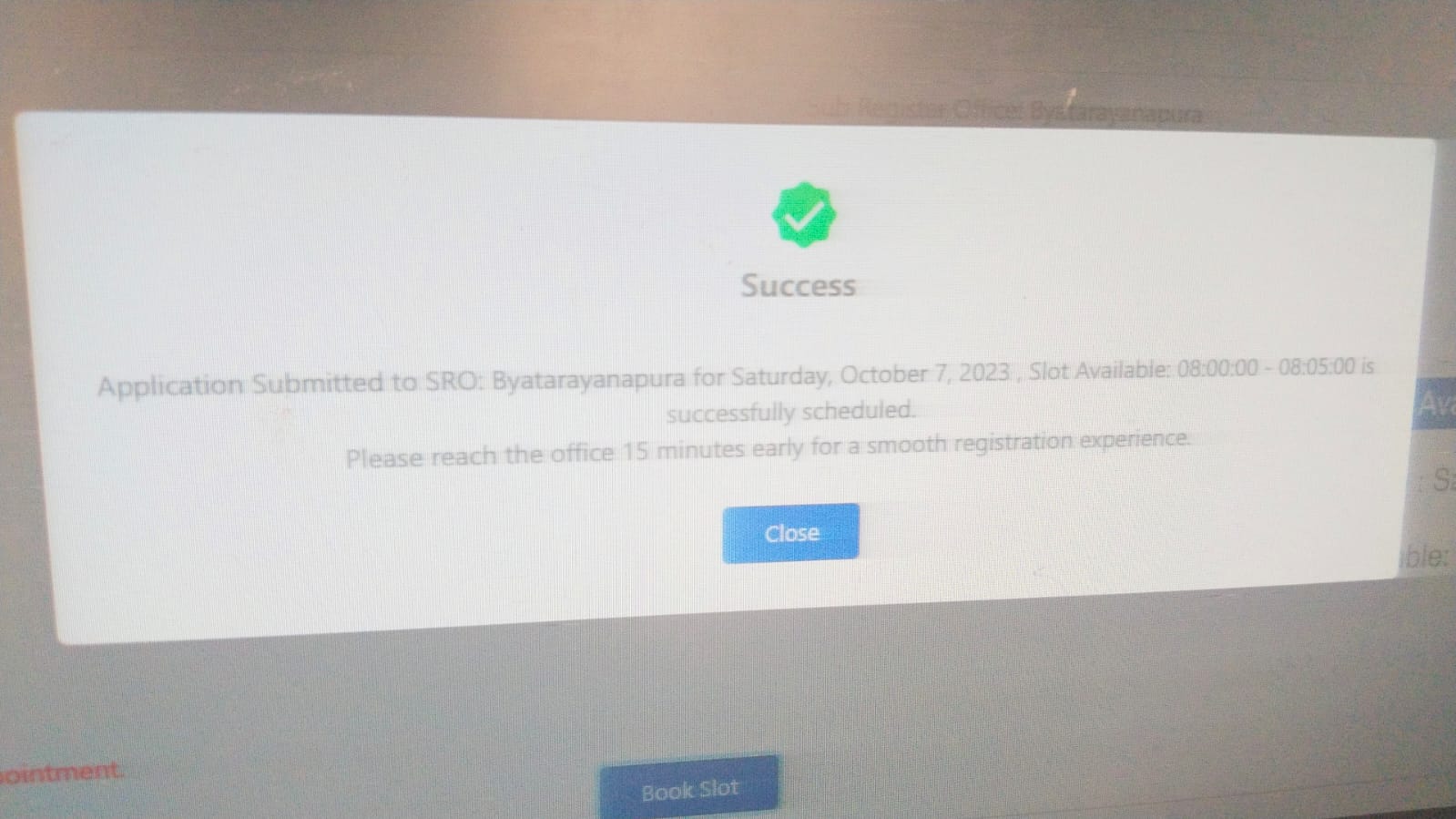
 We got the registration slot tomorrow morning. image below is my slot confirmation.
We need printout of summary report for tomorrow's registration, we followed procedure below to take the printout. Click View on the home page. Refer to arrow mark in below image
 Click on the Printer symbol. Refer to the below image
 Take a printout, the application consists of 5–6 pages. (Use back to back printouts to save paper from 3 instead of 6 pages)
As per the schedule, we carried the following documents to sub-registrar's office:
- Exemption letter
- Memorandum of Deposit of Title Deed
- Printout of application summary report
- Printout of transaction receipt
- ID proofs
 Just within 15 minutes, we completed our registration.
VERIFY MODT ENTRY IN EC Log into Kaveri Online Service and click on Start a New Application. Refer to the below image
 Click on ENCUMBERANCE CERTIFICATE -(ONLINE EC). Refer to below image
 In Prerequisite for EC, click on Continue. Refer to below image
 Select District, Taluk, Hobli, and village name from dropdown list. Enter flat number. Refer to below image
 In PERIOD OF EC SEARCH: We registered this MODT on 7th October 2023. I just need one day EC for cross verification, so I selected 7th Oct 2023 in From Date and To Date as well
Click on Search. Refer to below image
In PERIOD OF EC SEARCH: We registered this MODT on 7th October 2023. I just need one day EC for cross verification, so I selected 7th Oct 2023 in From Date and To Date as well
Click on Search. Refer to below image
 Below image is my search result.
 As per the above search result, the borrower's name in column no. 5 and bank’s name in column no. 6. It means that we successfully registered the MODT.
HANDOVER TO BANK Carry the following title documents to the bank:
- Registered MODT
- Registered Sale Deed
- Latest Encumbrance Certificate (EC) - EC should reflect the transaction details of the MODT and Sale Deed
NEED ASSISTANCE? We provide end-to-end assistance for MODT registration in Karnataka.
- Write to us at: pgnproperties@gmail.com
- WhatsApp: +91 97424 79020