
Have you encountered the error message “THE PROPERTY IS AVAILABLE BUT NON-TRANSACTABLE” while trying to proceed with property registration on Kaveri Online Services?
This issue may prevent you from proceeding with a property transaction, even when your eKhata has already been issued.
In this guide, we explain what a non-transactable eKhata means, why this message appear, and how to make your eKhata transactable by submitting your Encumbrance Certificate (EC) details through the eAasthi 2.0 portal.
WATCH OUR VIDEO GUIDE:
What Does “Property Is Available but Non-Transactable” Mean?
When you attempt to register a property through Kaveri Online Services, the system may display the message “THE PROPERTY IS AVAILABLE BUT NON-TRANSACTABLE.”
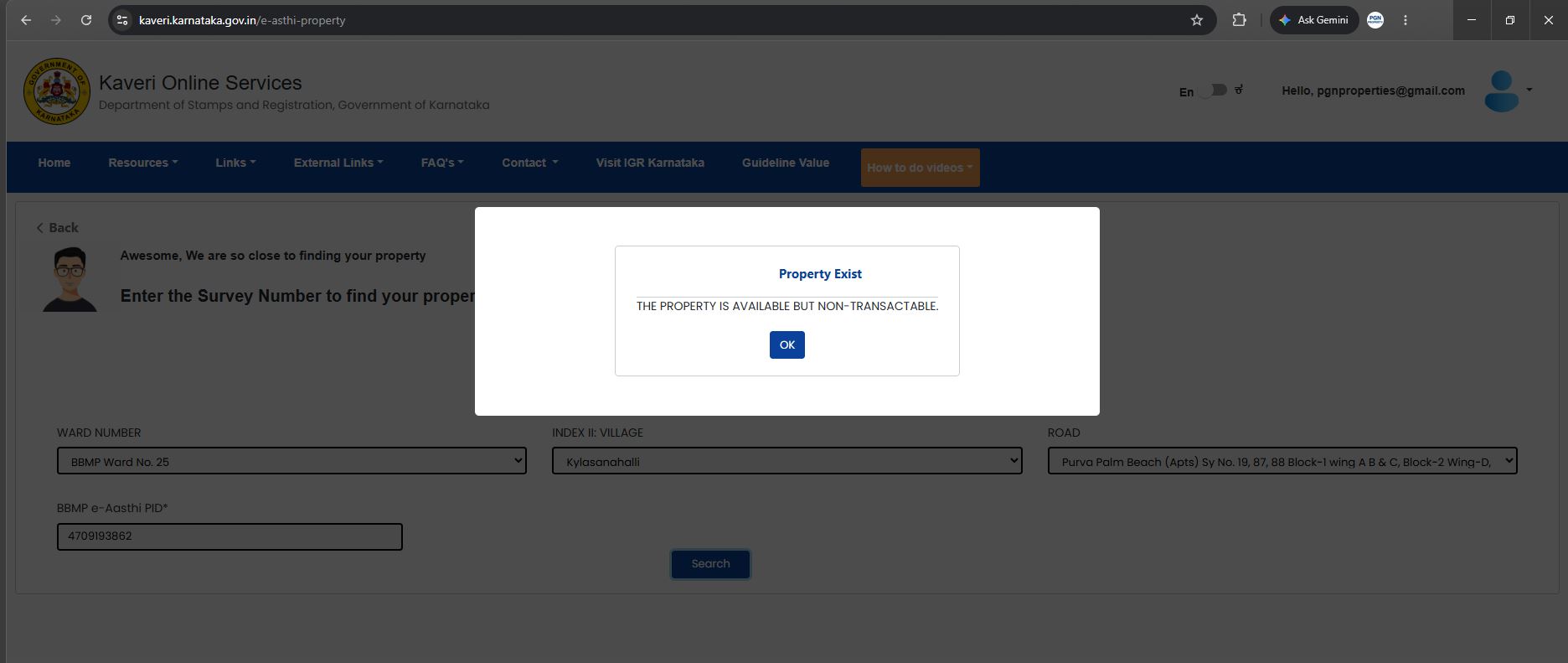
This indicates that the property record is available in the system but is not currently enabled for a transaction through the portal.
The non-transactable status acts as a security measure to help prevent the misuse of eKhata records. In such cases, the property's transaction status may need to be updated by submitting the relevant Encumbrance Certificate (EC) details through the eAasthi 2.0 portal.
If your eKhata is marked as non-transactable, you can follow the steps below to submit your EC details and check whether the property becomes eligible for a transaction.
What Documents or Details Are Required to Make eKhata Transactable?
Before starting the process, keep the following two details ready:
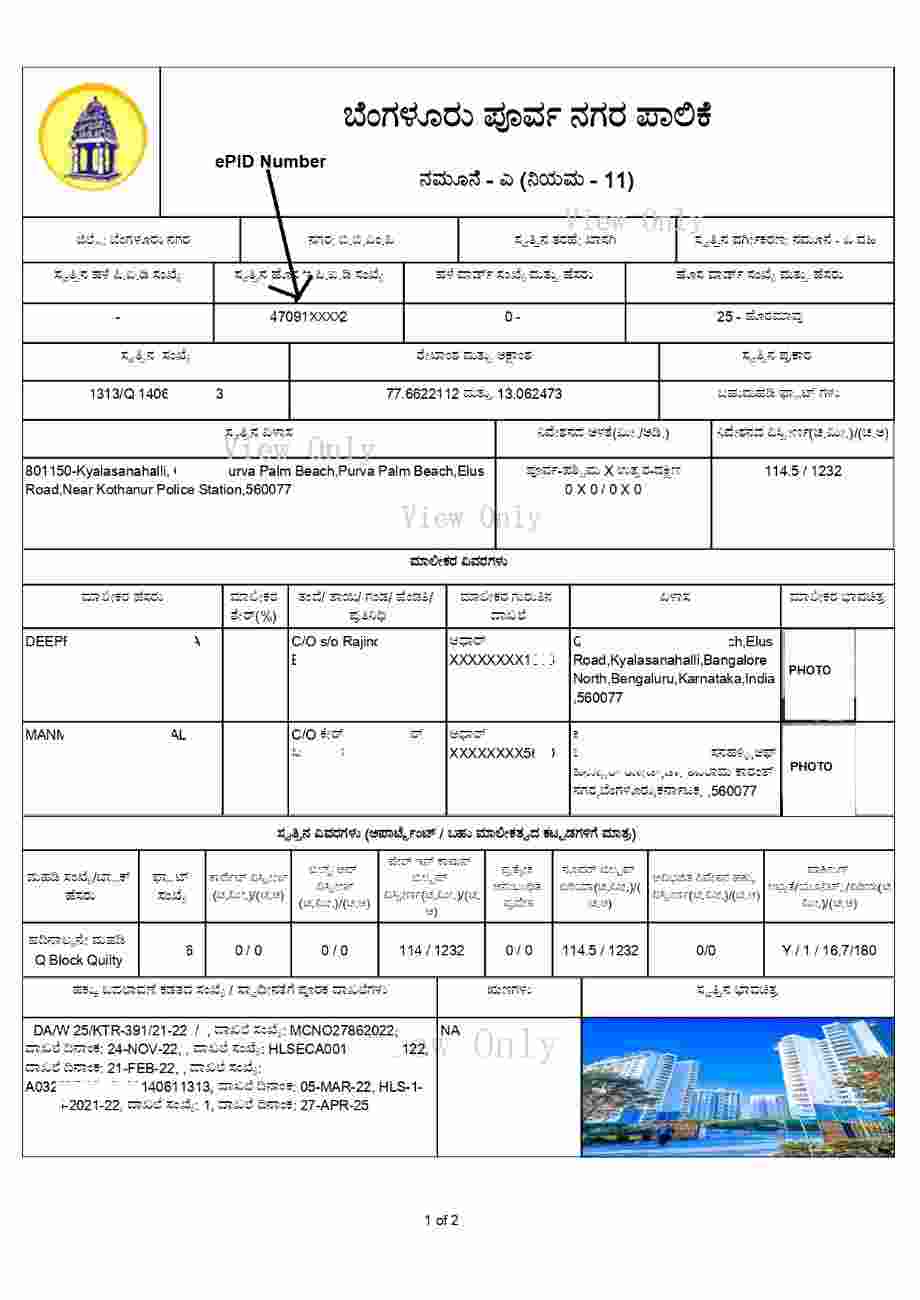
- ePID Number: The Electronic Property Identification Number associated with your eKhata.
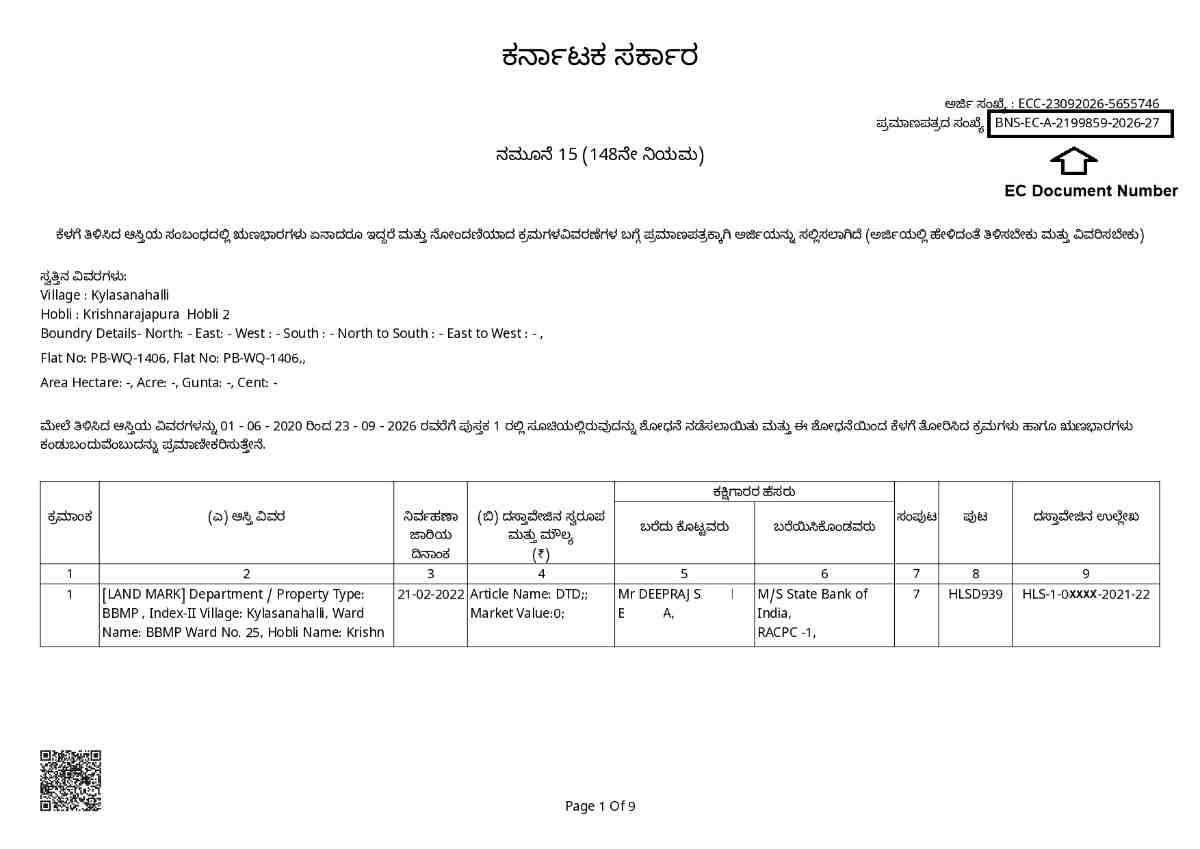
- Encumbrance Certificate (EC) Document Number: The document number mentioned in your latest EC.
1. How to Find Your ePID Number
You can find your ePID number on your eKhata document. Keep this number ready, as it will be required to search for your property on the eAasthi 2.0 portal.
2. How to Find Your EC Document Number
You can find the EC document number on your Encumbrance Certificate. For reference, check the document number mentioned in latest Form 15 EC.
Step-by-Step Guide to Make eKhata Transactable on eAasthi 2.0
Follow these steps to submit your EC details and check your property's transaction status.
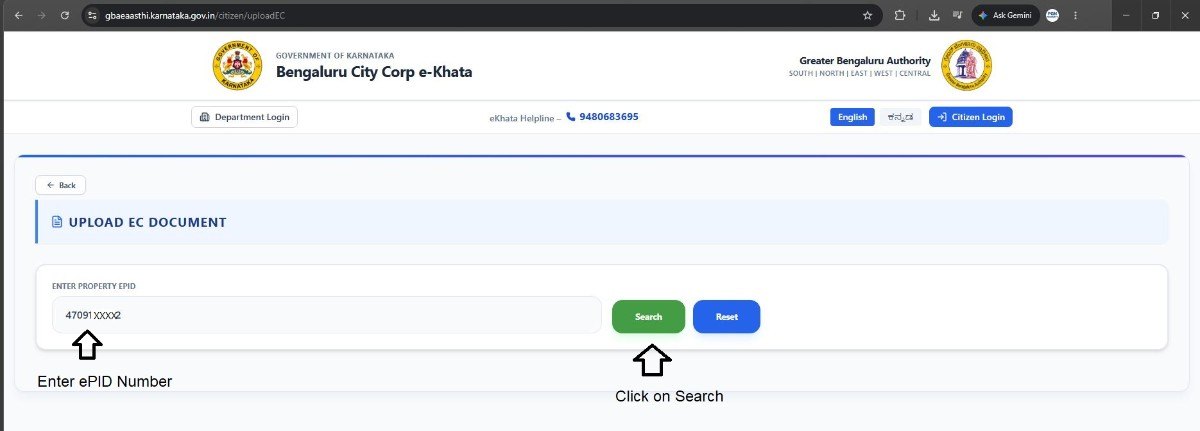
Step 1: Open the EC Upload Page on eAasthi 2.0
Visit the official eAasthi 2.0 EC upload page using the link below:
EC Upload Portal: https://gbaeaasthi.karnataka.gov.in/citizen/uploadEC
Step 2: Enter Your ePID Number
On the EC upload page, enter your property's ePID number in the search box.
Click “Search” to retrieve your property details.
Step 3: Enter the EC Document Number
After your property details are displayed, enter the EC document number from your latest Encumbrance Certificate.
Click “Fetch EC Data” to retrieve the EC information.
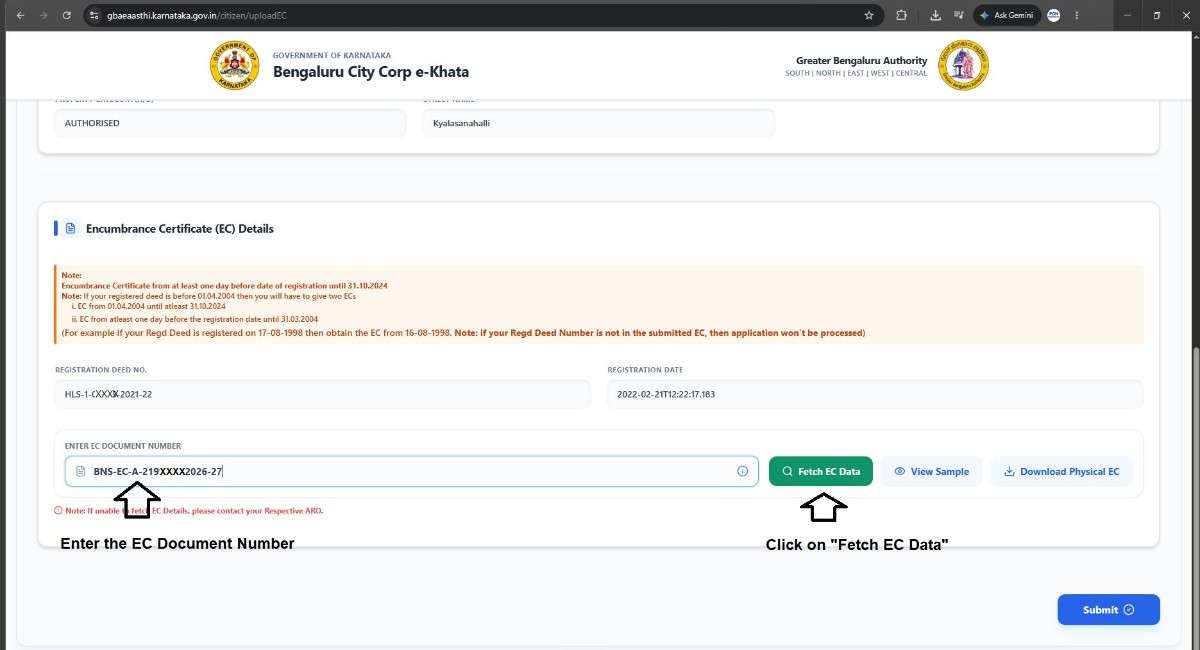
Step 4: Submit the EC Details
After fetching the EC data, click “Submit” to submit the details through the portal.
Allow the portal to process your submission and check the updated status of your property.
Step 5: Check Whether Your Property Is Ready for a Transaction
After submitting the EC details, check the status displayed on the eAasthi,
Yes, indicates that ekhata status has changes to transactable
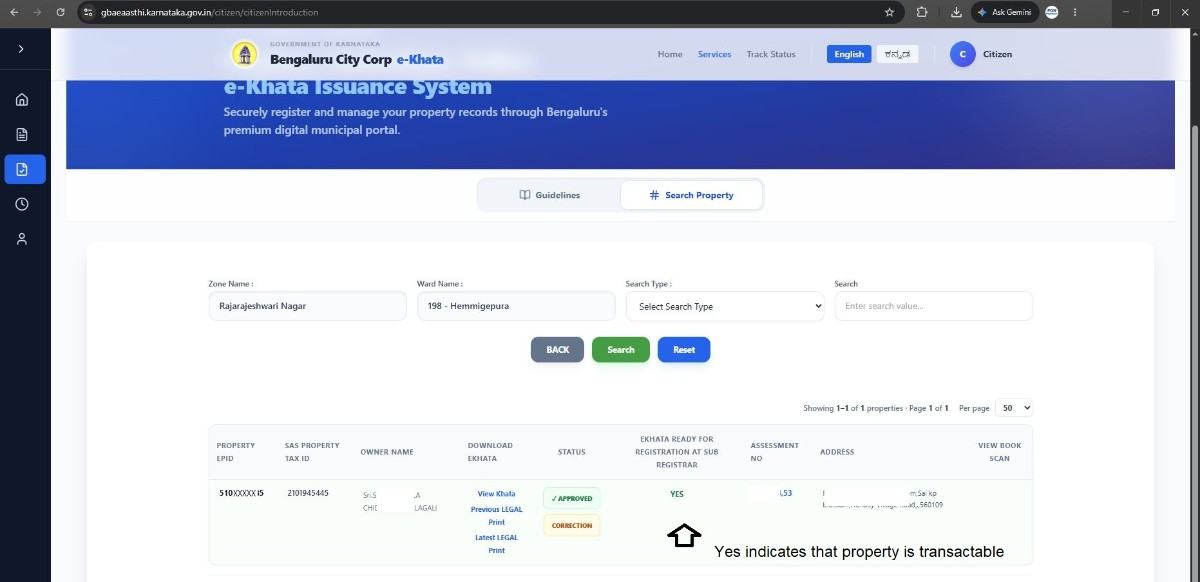
This means that the property's transaction status has been updated in the portal. You can then check whether the property can proceed with registration on Kaveri Online Services.
Conclusion
If you encounter the message “THE PROPERTY IS AVAILABLE BUT NON-TRANSACTABLE” while initiating property registration on Kaveri Online Services, submitting your Encumbrance Certificate details through the eAasthi 2.0 EC upload page may help resolve the issue.
Need assistance with eKhata or property registration?
PGN Property provides property documentation, eKhata assistance, and property registration support.
Website: https://pgnpropertymanagement.in/
Email: pgnproperties@gmail.com
Contact: +91 97424 79020