
If you are unable to find the certified copy of your sale deed on Kaveri Online Services, don't worry. This is a common issue faced by many property owners in Karnataka.
Watch our video guide:
There are few reasons why your sale deed may not appear on the portal:
- The record has not been digitized.
- Incorrect details such as the Sub-Registrar Office, Document Number, or Year of Registration were entered while searching.
Sale Deeds Registered Before 2004
If your sale deed was registered before 2004, there is a possibility that the record has not yet been digitized and uploaded to Kaveri Online Services.
In such cases, you can apply for a Certified Copy directly at the same Sub-Registrar Office where the property was originally registered. Generally, the certified copy can be obtained within 2–3 working days.
Sale Deeds Registered After 2004
If your sale deed was registered after 2004, you should normally be able to find the certified copy on Kaveri Online Services.
However, if the portal still shows "No Record Found", it is usually because of incorrect details such as the Sub-Registrar Office, Document Number, or Year of Registration
Let me give you one interesting real example.
Case Study
One of our clients had registered a sale deed in 2006 with the following registration number:
BAS-1-17XXX-2006-07
The registration number can be understood as follows:
- BAS – Bangalore South Sub-Registrar Office
- 1 – Book Number
- 17XXX – Document Number
- 2006-07 – Registration Year
When we searched the document on Kaveri Online Services using these exact details, the system displayed "No Record Found."
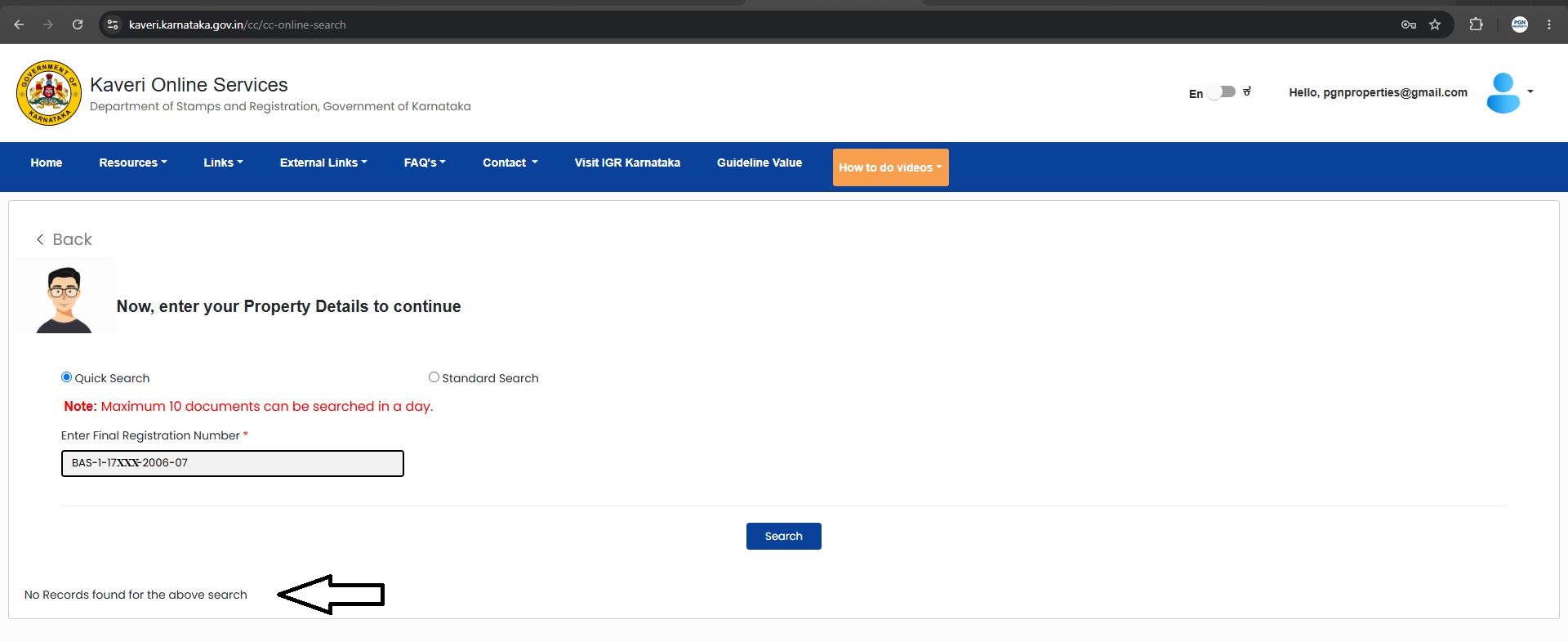
Initially, it appeared that the document was missing. However, after further verification, we found that the issue was not with the document itself.
Why Did This Happen?
Kaveri Online Services indexes records based on the current Sub-Registrar Office name, rather than the old sub registrar office name where the document was originally registered.
As a result, documents registered under an old office name may now be searchable under the current Sub-Registrar Office name.
Solution
In this case, the property was originally registered under the Bangalore South Sub-Registrar Office in 2006.
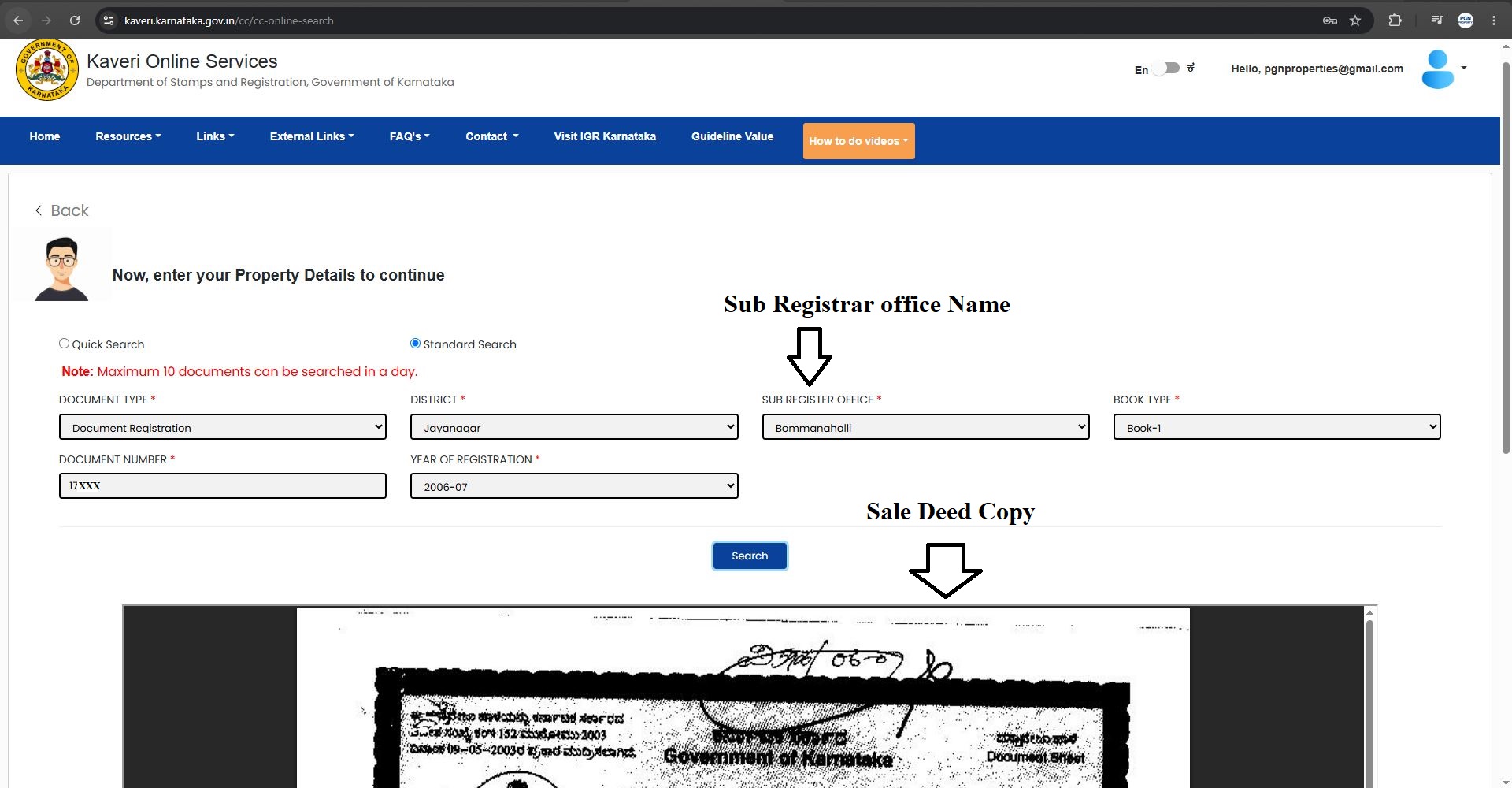
Today, the same office falls under the Bommanahalli Sub-Registrar Office.
When we searched the document by selecting Bommanahalli Sub-Registrar Office, the sale deed was immediately available for download.
If Your Sale Deed Was Registered Between 2004 and 2010
If you are unable to locate your sale deed on Kaveri Online Services, try searching under the present-day Sub-Registrar Office.
Bangalore South
If your deed was originally registered in Bangalore South, search under:
- Bommanahalli Sub-Registrar Office
- Jayanagar Sub-Registrar Office
Bangalore East
If your deed was registered in Bangalore East, search under:
- Indiranagar Sub-Registrar Office
- KR Puram Sub-Registrar Office
Bangalore North
If your deed was registered in Bangalore North, search under:
- Yelahanka Sub-Registrar Office
- Malleshwaram Sub-Registrar Office
Bangalore West
If your deed was registered in Bangalore West, search under:
- Vijayanagar Sub-Registrar Office
- Peenya Sub-Registrar Office
- Srirampuram Sub-Registrar Office
Final Thoughts
If your sale deed certified copy is not available on Kaveri Online Services, it does not necessarily mean that the record is missing. Before concluding that the document is unavailable, verify the Sub-Registrar Office, document number, and registration year. For older registrations, always search using the current Sub-Registrar Office name, as records are indexed under the updated office name.
Need assistance with your Sale Deed Certified Copy, Encumbrance Certificate (EC), Property Registration, e-Khata, Power of Attorney,
Email: pgnproperties@gmail.com
Call/WhatsApp: +91-9742479020
Website: https://pgnpropertymanagement.in/